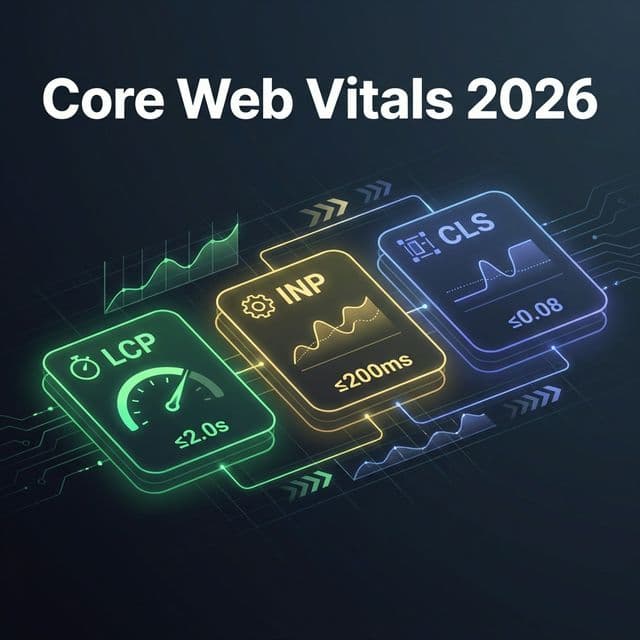
If your website's traffic has dropped or you've noticed ranking fluctuations, failing Google's Core Web Vitals thresholds could be the culprit. Core Web Vitals are a confirmed Google ranking signal, and the biggest recent change is that INP replaced FID as a Core Web Vital in 2024 — catching many businesses unprepared for the tougher responsiveness bar.
More importantly, Interaction to Next Paint (INP) officially replaced First Input Delay (FID) as the primary responsiveness metric—and if you haven't optimized for it yet, your website is likely underperforming in search results.
In this comprehensive guide, we'll cover what changed in Core Web Vitals 2026, why INP is now critical for SEO rankings, how to measure your website's performance, step-by-step fixes to pass all three thresholds, and real business impact of poor Core Web Vitals.
Don't have time to fix this yourself? Get a free website performance audit → and we'll show you exactly what's slowing down your site.
Key Facts: Core Web Vitals 2026
- • LCP (Largest Contentful Paint) — Good: under 2.5s, Needs Improvement: 2.5–4s, Poor: over 4s
- • INP (Interaction to Next Paint) replaced FID in March 2024 — Good: under 200ms
- • CLS (Cumulative Layout Shift) — Good: under 0.1
- • Pages passing all three CWV thresholds rank higher in Google as a tie-breaker
- • CWV data comes from real Chrome users (CrUX), not just lab tests
- • Last updated:
What Are Core Web Vitals?
Core Web Vitals are a set of performance metrics that Google uses to measure user experience quality. They directly impact your SEO rankings, conversion rates, and user satisfaction.
Think of Core Web Vitals as Google's way of answering three critical questions:
- How fast does my website load? (Largest Contentful Paint — LCP)
- How quickly can users interact with it? (Interaction to Next Paint — INP, replacing FID)
- How stable is the layout while loading? (Cumulative Layout Shift — CLS)
According to Google, pages that meet Core Web Vitals thresholds have 24% lower abandonment rates and significantly higher engagement compared to poor-performing pages.
Direct SEO impact
Poor CWV = lower rankings
User experience
Slow sites lose 53% of mobile visitors
Conversion rates
1s delay = 7% drop
Competitive edge
Most sites fail Core Web Vitals
What Changed in January 2026?
🔴 Critical Change #1: INP Replaces FID
Old Metric (FID — First Input Delay): Measured only the first interaction on a page. If your first click was fast but everything afterward was sluggish, you still passed.
New Metric (INP — Interaction to Next Paint): Measures all interactions throughout the entire page visit, identifying the slowest response time. This gives a complete picture of page responsiveness.
📊 The Official Core Web Vitals Thresholds (2026)
Each Core Web Vital has three bands — Good, Needs Improvement, and Poor. To pass, all three metrics must be in the "Good" range for at least 75% of real-user visits:
| Metric | Good (Pass) | Needs Improvement | Poor |
|---|---|---|---|
| LCP (loading) | ≤ 2.5s | 2.5s – 4.0s | > 4.0s |
| INP (responsiveness) | ≤ 200ms | 200ms – 500ms | > 500ms |
| CLS (visual stability) | ≤ 0.1 | 0.1 – 0.25 | > 0.25 |
Source: web.dev — Web Vitals and Google Search Central. Note: INP replaced FID as a Core Web Vital in March 2024.
🔴 Critical Change #2: Mobile-First Performance
Google now prioritises mobile Core Web Vitals over desktop. If your mobile site is slow, you're penalised — even if desktop performs well.
Shocking Stat: Only 37% of websites currently pass the new 2026 thresholds on mobile devices.
Understanding INP: The New Responsiveness Metric
INP (Interaction to Next Paint) is Google's new standard for measuring how responsive your website feels to users.
What Exactly is INP?
INP measures the time between when a user interacts with your page (clicks a button, taps a link, types in a form) and when the browser visually responds to that action.
❌ Bad INP (500ms+)
User clicks "Add to Cart" → waits half a second → cart icon finally updates
User Thought: "Is this site broken?"
✅ Good INP (<200ms)
User clicks "Add to Cart" → cart instantly updates
User Thought: "This site is fast and reliable!"
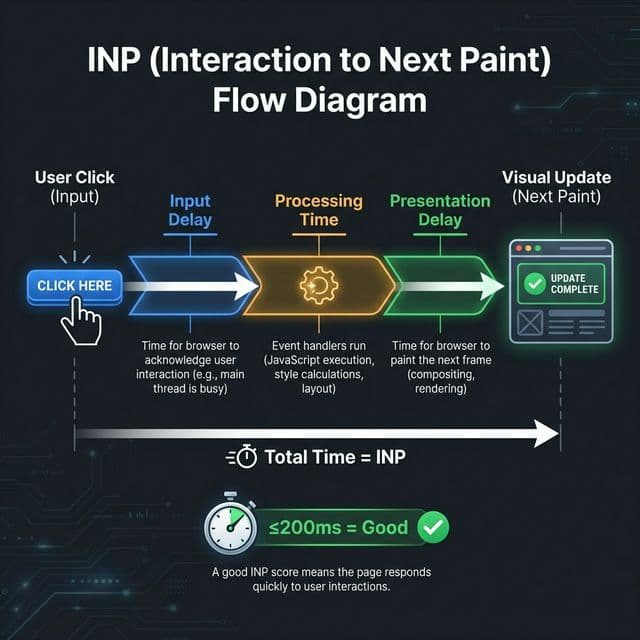
The three phases of INP: Input Delay + Processing Time + Presentation Delay
INP Thresholds for 2026
🟢 Good
≤ 200ms
🟡 Needs Work
201–500ms
🔴 Poor
> 500ms
The 3 Core Web Vitals Thresholds Explained
LCP
Loading performance — how long until the main content is visible. Directly correlates with perceived page speed.
INP
Responsiveness — how quickly your page responds to user interactions like clicks, taps, and keyboard input. INP replaced FID in 2024.
CLS
Visual stability — how much visible content unexpectedly shifts during page load. Lower is better.
Why Core Web Vitals Matter for SEO & Business
Core Web Vitals aren't just technical metrics — they directly impact your bottom line.
💰 Business Impact
27%
conversion increase from 1s LCP improvement
15–30%
organic traffic drop from failing CWV
53%
of mobile users abandon slow sites
🎯 Competitive Advantage
Most businesses haven't optimized for 2026 thresholds yet. Early movers gain significant advantages:
- Outrank competitors who ignore performance
- Capture abandoning traffic from slow competitor sites
- Build trust through fast, professional user experience
- Improve ad performance — faster landing pages = better Quality Score
How to Measure Your Core Web Vitals
Before fixing issues, you need to know your current performance. Here are the best tools:
How to Fix LCP (Largest Contentful Paint)
🎯 Goal: LCP ≤ 2.5 seconds (mobile)
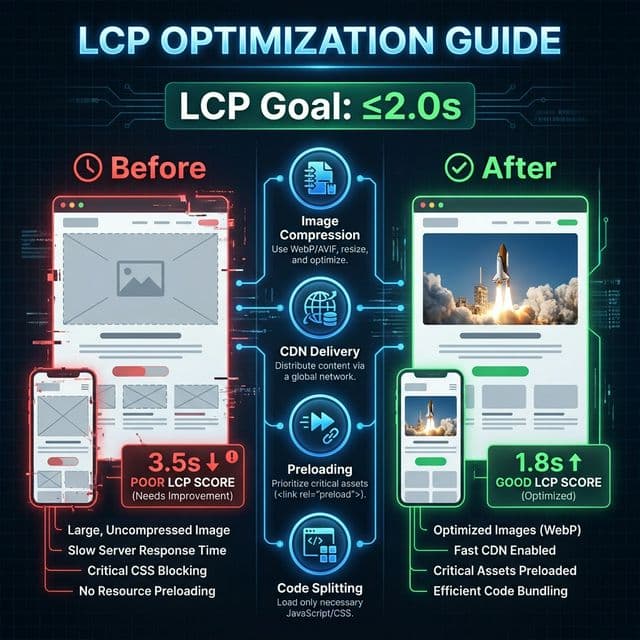
LCP optimization: from 3.5s to 1.8s with the right techniques
Step 1: Identify Your LCP Element
Run your URL through PageSpeed Insights, scroll to "Diagnostics", and find the "Largest Contentful Paint element". It's usually a hero image, product photo, or large text block.
Step 2: Optimize Images
- • Use WebP format (70–80% smaller than PNG/JPG)
- • Compress to 70–85% quality
- • Resize to exact display dimensions
- • Add
fetchpriority="high"to LCP image - • Never lazy-load your LCP image
✅ Correct — load LCP image immediately:
<img src="/hero.webp" fetchpriority="high" width="1200" height="600">❌ Wrong — don't lazy load LCP image:
<img src="/hero.webp" loading="lazy">Step 3: Server & Delivery Optimization
- • Use a CDN (Cloudflare, Vercel Edge, AWS CloudFront)
- • Enable Brotli/GZIP compression
- • Implement server-side rendering (SSR) or static generation
- • Preload critical above-the-fold resources
- • Remove render-blocking CSS and JS
For a deeper dive, check our guide on website speed optimization.
How to Improve INP (Interaction to Next Paint)
🎯 Goal: INP ≤ 200 milliseconds
1. Break Up Long Tasks
Any JavaScript task over 50ms blocks the main thread and delays interactions. Use setTimeout, requestIdleCallback, or scheduler.yield() to break large tasks into smaller chunks.
2. Defer Non-Critical JavaScript
- • Add
deferorasyncto third-party scripts - • Lazy-load analytics, chat widgets, and social embeds
- • Use dynamic
import()for below-the-fold components
3. Optimize Event Handlers
- • Debounce scroll and resize handlers
- • Avoid complex DOM queries inside event listeners
- • Use
requestAnimationFramefor visual updates - • Move heavy computations to Web Workers
4. Reduce JavaScript Bundle Size
- • Audit and remove unused dependencies
- • Tree-shake unused code during builds
- • Code-split routes and heavy components
- • Replace heavy libraries with lighter alternatives
How to Reduce CLS (Cumulative Layout Shift)
🎯 Goal: CLS ≤ 0.1
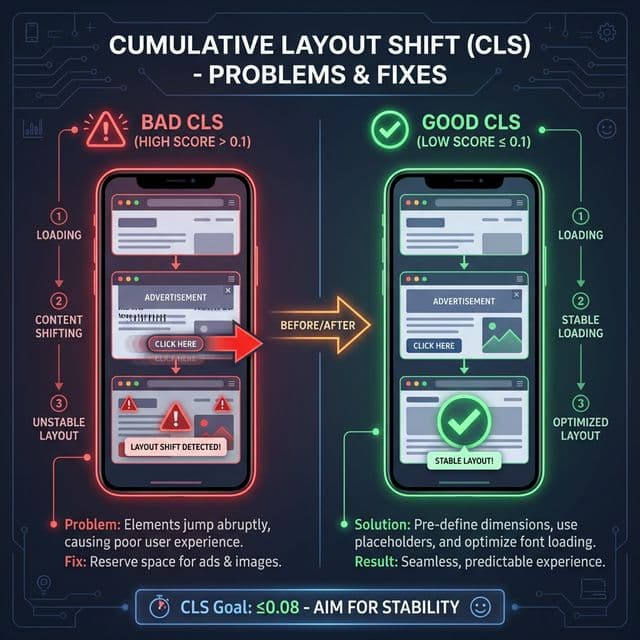
Bad CLS causes frustrating layout jumps; good CLS means a stable, predictable experience
1. Always Set Image Dimensions
Include width and height on every <img> and <video> tag. This lets the browser reserve space before the media loads.
2. Reserve Space for Dynamic Content
- • Use
min-heightfor ad slots and embeds - • Add placeholder skeletons for lazy-loaded content
- • Avoid inserting content above existing visible elements
3. Handle Web Fonts Properly
Use font-display: swap to prevent invisible text, and preload your primary web font with <link rel="preload">. Consider using size-adjust on fallback fonts to minimise reflow when custom fonts load.
4. Use CSS Containment
Apply contain: layout or content-visibility: auto to sections that render off-screen, preventing them from triggering layout shifts when they load.
Advanced Performance Optimization Strategies
Edge Computing
Deploy to edge networks (Vercel Edge, Cloudflare Workers) to serve content from locations closest to users, dramatically reducing TTFB and LCP.
Progressive Enhancement
Serve a functional HTML-first experience, then enhance with JavaScript. This ensures fast initial loads and good INP even when JS is slow to initialise.
Resource Hints
Use preconnect, preload, and prefetch strategically. Preconnect to critical third-party origins; preload LCP resources; prefetch likely next-page resources.
Image Optimisation Pipeline
Implement automatic WebP/AVIF conversion, responsive srcset with multiple sizes, and blur-up placeholders using tools like Next.js Image or Cloudinary.
Case Study: Real Results from Core Web Vitals Optimization
An e-commerce client came to us with poor Core Web Vitals scores that were hurting their rankings and conversions:
LCP
3.8s → 1.7s
55% faster
INP
420ms → 180ms
57% faster
CLS
0.18 → 0.04
78% better
Results after 60 days:
- 42% revenue increase from improved conversion rates
- 28% more organic traffic from improved rankings
- 35% lower bounce rate across all pages