Google Business Profile Optimization Checklist for Delhi NCR (2026)
Google Business Profile (GBP) optimization is the process of completing, verifying and continuously improving your free Google business listing so it ranks higher in Google Maps and the local “3-pack” — the three businesses shown above regular search results when someone searches for a service near them.
For Delhi NCR businesses, this matters more than almost anything else in local marketing. 46% of all Google searches have local intent, and 42% of local-search clicks go to the Maps 3-pack (Source: GoogleSearchStatistics/HubSpot). If you're a clinic in Lajpat Nagar, a manufacturer in Faridabad or a coaching institute in Noida, ranking in that 3-pack is the difference between a steady flow of calls and silence.
This is a practical, do-it-today checklist — 25 actionable points across 7 sections. Tick each box. No fluff, no theory. For the deeper “why” behind local SEO, read our complete local SEO & GBP guide.
Want your GBP done for you?
Book a free GBP audit and we'll show you exactly what's missing — no obligation.
At a Glance: GBP Optimization Priorities for Delhi NCR
- Claim and verify your profile — nothing ranks until you're verified
- Use a consistent NAP (Name, Address, Phone) across every platform
- Pick the most specific primary category, then add secondary categories
- Write a keyword-rich, 750-character business description
- Add 10+ real photos and refresh them monthly
- Get a steady flow of Google reviews and reply to every one
- Post weekly Google updates and keep hours/holidays current
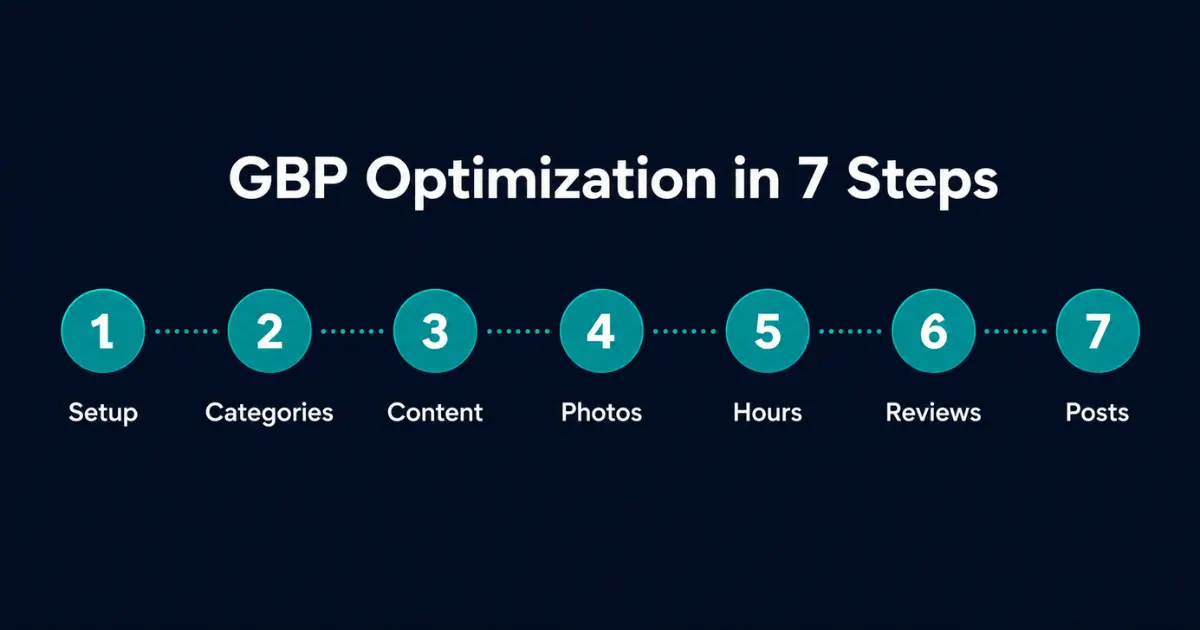
The Complete 25-Point GBP Checklist (Quick Reference)
| # | Checklist Item | Priority | Section |
|---|---|---|---|
| 1 | Claim your Google Business Profile | 🔴 Critical | Setup |
| 2 | Complete verification (video/postcard) | 🔴 Critical | Setup |
| 3 | Match NAP exactly to your website | 🔴 Critical | Setup |
| 4 | Choose the most specific primary category | 🔴 Critical | Categories |
| 5 | Add all relevant secondary categories | 🟠 High | Categories |
| 6 | Set accurate service areas (Delhi, Noida, Gurgaon…) | 🟠 High | Categories |
| 7 | Write a 750-char keyword-rich description | 🟠 High | Content |
| 8 | List all services with descriptions | 🟠 High | Content |
| 9 | Add products with photos and prices | 🟡 Medium | Content |
| 10 | Upload your logo and cover photo | 🟠 High | Photos |
| 11 | Add 10+ interior/exterior/team photos | 🟠 High | Photos |
| 12 | Add a short intro video (under 30s) | 🟡 Medium | Photos |
| 13 | Set correct business hours | 🔴 Critical | Hours |
| 14 | Add special/holiday hours | 🟡 Medium | Hours |
| 15 | Enable messaging | 🟡 Medium | Engagement |
| 16 | Ask for 5+ Google reviews this month | 🔴 Critical | Reviews |
| 17 | Reply to every review within 48 hours | 🟠 High | Reviews |
| 18 | Use keywords naturally in review replies | 🟡 Medium | Reviews |
| 19 | Post a Google Update weekly | 🟠 High | Posts |
| 20 | Add a “Book”/“Call”/“WhatsApp” action button | 🟠 High | Posts |
| 21 | Answer the Q&A section (seed your own FAQs) | 🟡 Medium | Posts |
| 22 | Add UTM-tagged website link for tracking | 🟡 Medium | Tracking |
| 23 | Keep NAP identical across all citations | 🟠 High | Citations |
| 24 | List on JustDial, Sulekha, IndiaMART, Apple Maps | 🟡 Medium | Citations |
| 25 | Review GBP Insights monthly | 🟡 Medium | Tracking |
Now work through each section below and tick the boxes.
Section 1 — Setup & Verification (Items 1–3)
This is the foundation. Nothing else matters until your profile is claimed, verified and consistent.
- ☐ Claim your profile. Go to business.google.com, search your business name, and claim it. If it doesn't exist, create it.
- ☐ Complete verification. Google now uses video verification for most Indian businesses — record a short clip showing your premises, signage and proof you operate there. Don't skip this; an unverified profile cannot rank in the 3-pack.
- ☐ Match your NAP exactly. Your Name, Address and Phone number must be identical to your website footer and contact page — same spelling, same abbreviations, same format. For Delhi NCR, decide once: “Faridabad, Haryana” or “Faridabad” — then use it everywhere.
NAP consistency is the single most common reason Delhi NCR businesses fail to rank. A “Rd” on Google and “Road” on your website confuses Google's entity matching.
Section 2 — Categories & Service Areas (Items 4–6)
Your primary category is the strongest ranking signal in GBP. Get it right.
- ☐ Choose the most specific primary category. Not “Doctor” — choose “Dermatologist.” Not “Shop” — choose “Mobile Phone Repair Shop.” Specific beats broad every time.
- ☐ Add all relevant secondary categories. A dental clinic might add “Cosmetic Dentist,” “Dental Implants Provider” and “Teeth Whitening Service.” Add every category that genuinely applies.
- ☐ Set accurate service areas. If you serve clients across Delhi NCR, list Delhi, Noida, Gurgaon, Ghaziabad and Faridabad as service areas. For a storefront, keep the physical address visible; for a service-area business, you can hide the address and show only the regions.
Section 3 — Business Information & Content (Items 7–9)
| Do | Don't |
|---|---|
| Lead with what you do + your city (“Web developer in Faridabad…”) | Stuff keywords unnaturally |
| Use all 750 characters | Leave it half-empty or blank |
| Mention key services and areas served | Add phone numbers or URLs (against guidelines) |
| Write for humans first, keywords second | Copy a competitor's description |
- ☐ Write a 750-character description. Front-load your primary service and city. Example: “Freelancer Abhi provides custom website development and SEO services for businesses across Delhi NCR…”
- ☐ List all services with descriptions. Use the Services section to add each offering with a 2–3 line description. These are searchable.
- ☐ Add products with photos and prices. Even service businesses can use Products as visual cards for packages (e.g., “Starter Website — ₹25,000”).
Section 4 — Photos & Video (Items 10–12)
Listings with photos get 42% more requests for directions and 35% more click-throughs than those without (Source: Google Business Profile data).
- ☐ Upload your logo and a cover photo. These define your brand at a glance.
- ☐ Add 10+ real photos. Interior, exterior, team, work samples, products. Real photos beat stock every time — Google and customers can tell.
- ☐ Add a short intro video (under 30 seconds). A simple phone-shot clip of your premises or team adds trust and multi-modal richness.
Tip: Refresh photos monthly. Active profiles signal an active business to Google.
Section 5 — Hours & Engagement (Items 13–15)
- ☐ Set correct business hours. Wrong hours = lost trust and lost customers who show up to a closed door.
- ☐ Add special/holiday hours. Diwali, Holi, Independence Day — update these in advance. Google prompts customers with “Hours might differ” if you don't.
- ☐ Enable messaging. Let customers message you directly from the listing. For Delhi NCR, this often converts better than a form.
Section 6 — Reviews (Items 16–18)
Reviews are the second-biggest local ranking factor after relevance and proximity.
- ☐ Ask for 5+ reviews this month. Send your happy clients a direct review link (Google gives you a short link in the dashboard). Ask in person, over WhatsApp, or in a follow-up email.
- ☐ Reply to every review within 48 hours. Thank positive reviewers; address negative ones calmly and professionally. Replies show Google — and future customers — that you're engaged.
- ☐ Use keywords naturally in replies. “Glad we could help with your Faridabad office website…” reinforces relevance without sounding forced.
For a complete review-generation system, see our Maps ranking guide for Faridabad.
Section 7 — Posts, Q&A & Tracking (Items 19–25)
- ☐ Post a Google Update weekly. Offers, new work, tips, announcements. Posts keep your profile fresh and appear in your listing.
- ☐ Add an action button. “Book,” “Call,” or a WhatsApp link — make the next step one tap away.
- ☐ Seed and answer the Q&A section. Post your own common questions and answer them. You control the narrative before competitors or trolls do.
- ☐ Add a UTM-tagged website link. Use
?utm_source=gbpso you can see GBP traffic in Google Analytics. - ☐ Keep NAP identical across all citations. JustDial, Sulekha, IndiaMART, Facebook, Apple Maps — same NAP everywhere.
- ☐ List on key Indian directories. JustDial, Sulekha, IndiaMART and Apple Business Connect are high-value for Delhi NCR.
- ☐ Review GBP Insights monthly. Track calls, direction requests, searches and photo views. Double down on what's working.
How Long Until You See Results?
GBP optimization is one of the fastest-moving levers in local SEO. After completing this checklist, most Delhi NCR businesses see measurable improvement in profile views and calls within 2–4 weeks, and meaningful 3-pack ranking gains within 30–90 days — depending on competition in your area and category. A dentist in a dense Gurgaon market will take longer than a niche manufacturer in Faridabad.
The key is consistency: a profile that gets fresh photos, weekly posts and steady reviews will always outrank a “set and forget” listing.
Why Choose Freelancer Abhi for GBP & Local SEO
Freelancer Abhi (ABHI & CO., UDYAM-HR-03-0143972) helps Delhi NCR businesses rank in the Google Maps 3-pack through complete GBP optimization, citation building and review strategy. Led by Abhishek Sharma — 7+ years experience, 50+ projects, 4.9/5 rating across 62+ reviews — we handle the full checklist above for you, plus the website-side local SEO (schema, NAP consistency, location pages) that GBP alone can't fix.
Frequently Asked Questions
How long does it take to optimize a Google Business Profile?
The core setup (claim, verify, categories, description, photos) takes 2–4 hours of focused work. Verification can take a few days if Google uses postcard or video review. Ongoing optimization — posts, reviews, photos — is a weekly 20–30 minute habit. Most Delhi NCR businesses see ranking improvements within 30–90 days of completing the full checklist.
What is the most important Google Business Profile ranking factor?
Three factors dominate: relevance (correct primary category + keywords), distance (proximity to the searcher), and prominence (reviews, citations, activity). You can't change a customer's distance, but you fully control relevance and prominence — which is why an accurate primary category, consistent NAP, and a steady flow of Google reviews matter most.
How many Google reviews do I need to rank in the Maps 3-pack?
There's no fixed number — it's relative to your competitors. If the top three businesses in your Delhi NCR category have 40–60 reviews, you need to be in that range and growing. More important than the total is recency and response rate: a steady trickle of new reviews you reply to beats a large but stale pile.
Can I optimize my Google Business Profile myself or do I need an expert?
You can absolutely do the setup yourself using this checklist. An expert helps when you're in a competitive Delhi NCR market, when you're not ranking despite a complete profile (usually NAP/citation issues), or when you want the website-side local SEO — schema markup, location pages, citation consistency — handled alongside GBP.
Does my website affect my Google Business Profile ranking?
Yes. Google cross-checks your GBP against your website for NAP consistency, and a fast, mobile-friendly site with LocalBusiness schema and location-relevant content strengthens your local ranking. A weak or missing website caps how high your GBP can climb — the two work together.
Conclusion
Your Google Business Profile is the highest-ROI free marketing asset a Delhi NCR business has. Work through these 25 points, keep the profile active with weekly posts and steady reviews, and you'll climb the Maps 3-pack faster than competitors who set it up once and forget it.
Want it done for you — correctly, the first time?
Book a free GBP audit and we'll show you exactly what's missing.
Related Articles You May Also Like
SEO in 2026: How to Optimise Google Business Profile & Local Listings
The complete guide to local SEO and GBP concepts behind this checklist.
Local SEO for Faridabad Businesses: How to Rank #1 on Google Maps (2026)
Faridabad-specific Maps ranking, review strategy and citation building.
Web Developer in Noida: Fast Websites for IT Companies & Startups (2026)
Custom Next.js websites for Noida IT companies and startups.
How Much Does a Website Cost in Delhi NCR in 2026?
Real 2026 price ranges, what drives the cost, and how to get genuine value.